
Hello everyone. Yes, it is 2020 and I am still speaking about ASA…
On one side I recently bought myself an ASA-5506-X with FirePOWER services, to extend my lab, to see how it works, and to do some experiments I can not do on a customer environment :). On the other side I also recently bought a Firepower 1010 to see the evolution Cisco made from ASA to ASA with FirePOWER and finally Firepower. We also have to assume that there are still a lot of ASA Firewalls out there and they will remain for a while before replacement.
At first sight, we may not find any difference between the wording Firepower and FirePOWER. But there is one… a significant one.
When Cisco mentions the word FirePOWER, then they talk about ASA-Devices with a Firepower Image on top running as a module.
In contrast to this, when Cisco speaks about Firepower then they are mentioning the Firepower Threat Defense device.
While reading this post, keep in mind that it is NOT a configuration guide. This text has been written with the simple purpose to describe the functionality, architecture and design without going too deep in detail.
Since this post ist related to the ASA with FirePOWER services in a specific mode, we will see how it works.
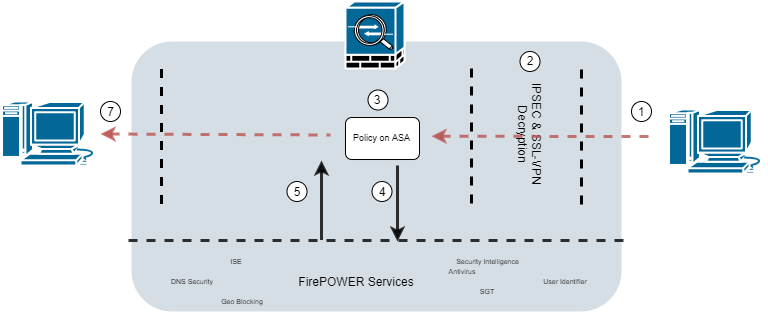
- A packet arrives at the outside interface.
- In case the traffic is encrypted and belongs to a tunnel, it will be decrypted.
- The packet will be checked against the policies setup on the ASA platform. If the traffic is accepted, it will be redirected to the FirePOWER instance if not, the traffic will be dropped without further inspection.
- The FirePOWER instance receives the traffic and inspects it.
- Based on the configured policies the instance will take a decision and sent it back to the ASA in order to send it back to the destination.
- The packet will arrive at the destination.
By default, even if the box is fully functional and correctly installed, the traffic won’t be passed to the FirePOWER instance. We will have to configure it by ourselves.
To accomplish this we will create an ACL for the traffic we would like to pass by to the FirePOWER instance.
access-list ACL_SFR extended permit ip any any
afterwards we will create a class-map where we will match all the traffic from the ACL „ACL_SFR“. We will name it „TO-SFR“ and it should look like this.
class-map TO-SFR
match access-list ACL_SFR
Finally we will merge our new class to the global policy and set the action „sfr fail-open“.
policy-map global_policy
class TO-SFR
sfr fail-open
Whats the difference between fail-open or fail-close?
fail-open tells the ASA to pass all the traffic uninspected in case the FirePOWER module is not available.
fail-close sets the ASA to drop all the traffic if the FirePOWER module is unavailable
As an example, the FirePOWER module can be unavailable during the upgrade of the module or due to lack of resources.
Packet flow through the Firepower
When referring to the path a packet takes while entering and exiting the firewall we talk about two main components: Platform and Software.
The Packet arrives on the ingress interface and will be checked and processed by the ASA:
- Is there an existing connection?
- Untranslate NAT if necessary.
- Check for egress interface.
- Check global ACL based on the given information.
- Perform QoS policing
In case all the mentioned steps have been passed and the packet is not dropped. The traffic matched into the service-policy will be passed for further inspection to the FirePOWER through the Data Acquisition Engine (DAQ), which is responsible to translate the packet so it can be checked properly other engines.
Access Control Policy
Here is where all the logic regarding the rules is shown. We can create rules with several parameters beyond layer-3/4. It looks very similar to a legacy firewall with source, destination, ports, logging, etc. But we are also able to configure further tabs with deeper inspection into the matched traffic.
Trusting traffic and Bypassing inspection
What does it exactly means to set up an access rule with the action „trust“?
The traffic hitted by this rule will skip deep inspection checks like „Security Intelligence“ (DNS, URL), Application Control, File Policies, or snort rules. It will simply perform „Identity check“ and Quality of Service (Rate limiting).
Other actions available
- Monitor: Traffic will be tracked but no actions will be taken.
- Allow: Traffic will be allowed to pass to further inspections.
- Block: Traffic will be dropped.
- Blocking with reset: The device will send an RST to the originator of the connection to immediately terminate it.
- Interactive block: We can define a specific message to be shown as a reason for the block. (Related to HTTP traffic)
Default action
Having a closer look at the default action on the access policies, we see at the bottom „Block traffic“ as the default action. This is the typical legacy action that we know from common firewalls. Next-Generation firewalls offer us additional options on how to handle traffic in case there was no matching. Every single action has a different amount of checks that will be performed against our connection. So they still can be a chance, that the traffic will be allowed.
Considerations before deployment in production
In a real case scenario, we should consider some important points before we release the deployment in a production environment.
We need to make sure that network traffic is being analyzed correctly and in a smart way. Therefore we should separate the duties in charge. The ASA should be responsible for sorting out the traffic and avoid passing unnecessary packets to the FirePOWER module. The module should only process interesting traffic that requires further deeper inspection.
Summarized ASA should check based on layer-3/4 information and the FirePOWER module should check everything on top of these layers.
You will have to maintain two different tables where the packets are being process. This does not mean that you will have to create always the same rule on FirePOWER that you created on the ASA. It could happen that a previous created rule also match for the new rule you have to apply.
Here a small example
Imagine you have an office, with 150 employees, that is being separated and protected from the internet by using an ASA-5506-X with FirePOWER services.
Imagine the employees in the marketing department mostly use web traffic to perform their business. Other departments only can access the internet during lunchtime.
As mentioned earlier we need two rules in order to process the traffic in a proper manner. Therefore we will need to create a rule on the ASA and one on the FirePOWER module.
On the ASA we will allow all the clients from this department to perform connections from the LAN to the Internet by using HTTP and HTTPS ports. Then we will create a second rule (time-based) that will allow web traffic only during lunch. Therefore we will make sure that only this traffic will be passed for further inspection since other traffic that is not specified will be dropped by the implicit deny rule.
We won’t configure any web filter on the ASA, this task should be outsourced to the FirePOWER.
the rule we created on the ASA will only inspect: source, destination and port used. What would happen if a client use this ports to connect to a remote service which doesn’t and exchange information
On the FirePOWER module, we could create only one rule in order to inspect and cover both rules defined on the ASA for HTTP and HTTPS traffic, which also will have a look at the type of the traffic avoiding clients sending or leaking information through HTTP(S) ports. It could also cover furthers rules
Here we will apply all our web filters based on category, rating, specific content or words in URL, etc.
Conclusion
Having two instances in the same box makes the traffic analyze complicated than having all in one. Once we understand how it works it is easy…
ASA 5500-X are not actual anymore, but as mentioned earlier there are still a lot in use, therefore it is important to understand that they work a bit different than a common firewall.
Thanks everyone. And hope to see you soon on my next post.
 I bit, therefore I byte