
Hello everyone! Today we will have a look at how to share the load between links using HSRP.
The topology looks very simple
We will have IOSv-3 and 4 trying to reach IOSv-5 across both routers in the middle (IOSv-1 & 2).
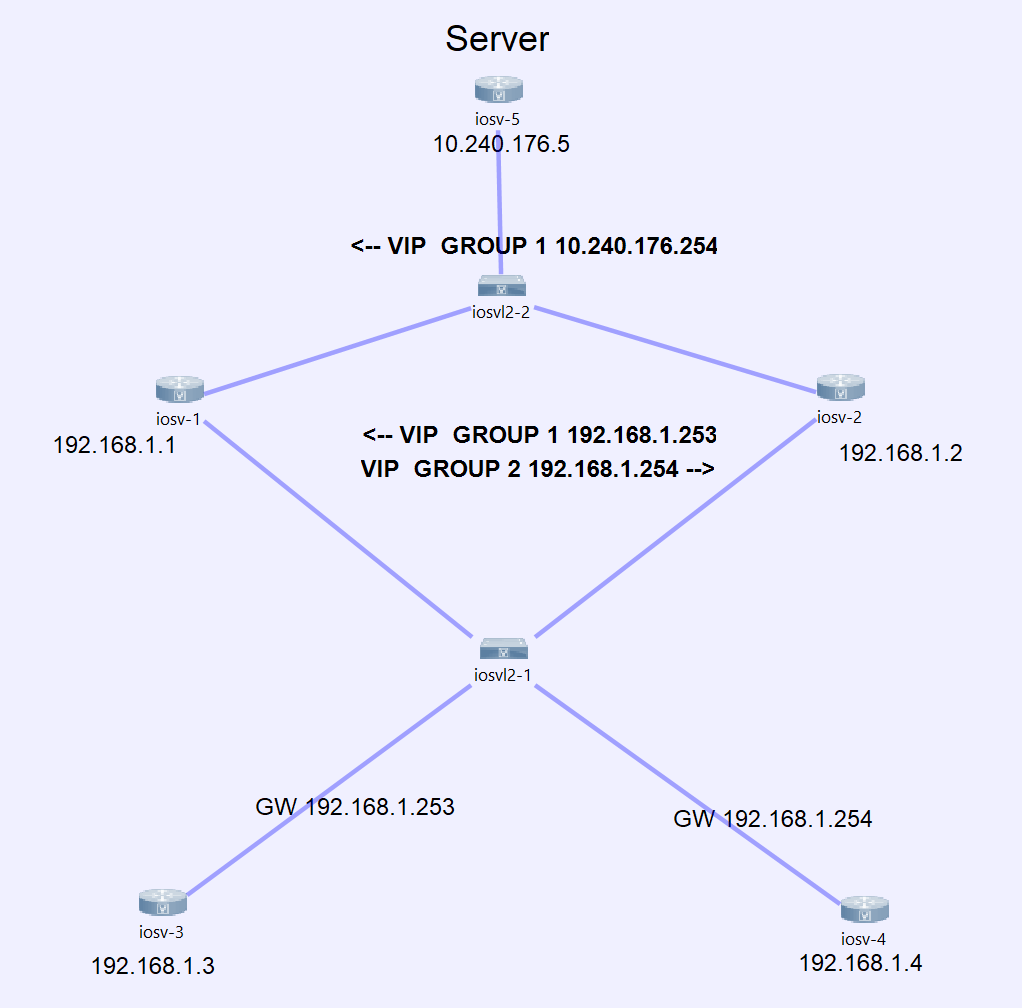
Both routers in the middle will use two different HSPR groups within the same subnet.
We will configure both routers on the bottom with static IPs and define the default gateway manually. One router will choose .254 as his gateway and the other .253.
On the other side, in the subnet where the server is located, we will also configure a single HSRP group in order to offer redundancy to the server.
Additionally, IOSv-1 & 2 will monitor the reachability of the server. Is the server not reachable, then they will decrement the priority of the HSRP groups, therefore the hosts will always able to reach the server also in case of failure.
Shown below the configuration for the devices.
The hosts
We will assign them a static IP-Address and one host will use the gateway 192.168.1.253 and the other one 192.168.1.254.
IOSv-3
interface GigabitEthernet0/1
ip address 192.168.1.3 255.255.255.0
no shut
!
ip route 0.0.0.0 0.0.0.0 192.168.1.253
IOSv-4
interface GigabitEthernet0/1
ip address 192.168.1.4 255.255.255.0
no shut
!
ip route 0.0.0.0 0.0.0.0 192.168.1.254
The Routers
IOSv-1 will take responsibility for group 1 (VIP 192.168.1.253) and group 3 (VIP 10.240.176.254). On the contrary, IOSv-2 will take over group 2 (VIP 192.168.254).
In case the IOSv-1 loses connectivity to the server the router will decrement his priority for group 1 & 3 invoking IOSv-2 to take the whole responsibility for the path.
IOSv-1
track 1 ip sla 1 reachability
!
ip sla 1
icmp-echo 10.240.176.5 source-interface GigabitEthernet0/2
frequency 5
ip sla schedule 1 life forever start-time now

interface GigabitEthernet0/1
ip address 192.168.1.1 255.255.255.0
standby 1 ip 192.168.1.253
standby 1 priority 150
standby 1 preempt
standby 1 track 1 decrement 51
standby 2 ip 192.168.1.254
standby 2 preempt
no shut
!
interface GigabitEthernet0/2
ip address 10.240.176.1 255.255.255.0
standby 3 ip 10.240.176.254
standby 3 priority 150
standby 3 preempt
standby 3 track 1 decrement 51
no shut
IOSv-2
track 1 ip sla 1 reachability
!
ip sla 1
icmp-echo 10.240.176.5 source-interface GigabitEthernet0/2
frequency 5
ip sla schedule 1 life forever start-time now
!
interface GigabitEthernet0/1
ip address 192.168.1.2 255.255.255.0
standby 1 ip 192.168.1.253
standby 1 preempt
standby 2 ip 192.168.1.254
standby 2 priority 150
standby 2 preempt
standby 2 track 1 decrement 51
no shut
!
interface GigabitEthernet0/2
ip address 10.240.176.2 255.255.255.0
standby 3 ip 10.240.176.254
standby 3 preempt
no shut
!
The Server
IOSv-5
interface GigabitEthernet0/1
ip address 10.240.176.5 255.255.255.0
no shut
!
ip route 0.0.0.0 0.0.0.0 10.240.176.254
Verification
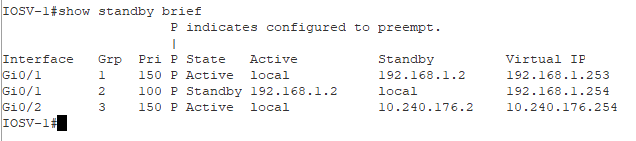
We will test the current status of the HSRP to see if everything its configured as expected.
IOSv-1
IOSv-2
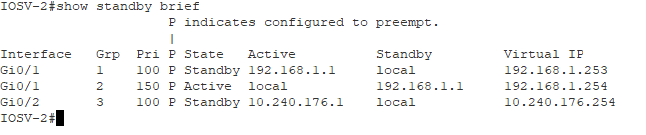
Seems to be fine. Now lets see the path the hosts use to reach the server.
From IOSv-3 to the server 10.240.176.5
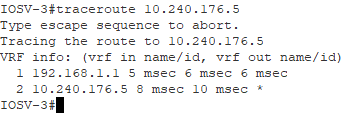
From IOSv-4 to the server 10.240.176.5
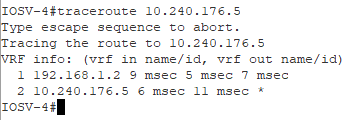
We clearly see that it is working as expected. Let us see what happens if we shut down the interface on router IOSv-1 towards the server.
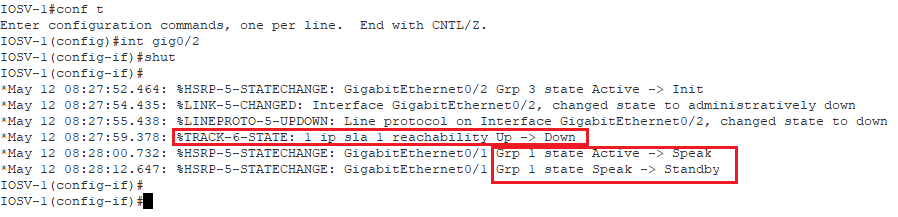
We can clearly see the interface went down and our track object could not be reached anymore, therefore the priority for group 1 has been decrement by 51, and it’s lower than the priority on the other router. This will lead to a switch of roles between both routers. Now, IOSv-2 has is the active router for all the groups.

It seems to work as expected. Surely we solve this issue in a different manner. Maybe I will post a second idea of how this can be done.
I hope this was helpfully for you.
See you on my next post!
 I bit, therefore I byte