
Hello everyone out there. It’s me again.
For more than 30 years the Spanning-Tree Protocol accompanied us through thick and thin along the datacenters. Network requirements also increased together with business requirements, and they become very high. So high that a loss of connectivity of a few seconds (due Spanning-Tree convergence) may have a huge impact in the productivity of our environment. We also should not forget about the ports in blocking state becomming an unused port of bandwidth within the network.
This is how Spanning-Tree helped us to solve many of the problems we had in the network.
In the picture below you can see 15 links accross the network. But only five are being used, the rest of the links will be in blocking state at one end of the connection.

Therefore a few new drafts (Around 2010) has been increated in order to overcome this difficulties. One of them is FabricPath.
Some of the befenits of FP:
- ECMP
- No bandwidth restrictions due a sub-optimal path
- more granular traffic engineering
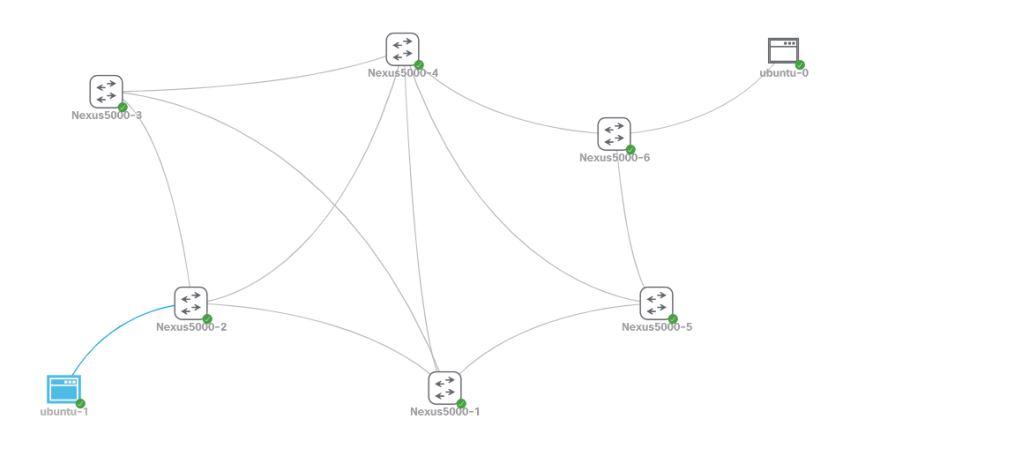
Now lets see another topology that has been created in CML2 Personal lab. The idea is to have all interconnection between links in a forwarding state. Installing a configuring FabricPath is not rocket science.
Configuration
install feature-set fabricpath
feature-set fabricpath
fabricpath switch-id 1
We have installed the feature and enabled it. After this we will assign each switch an id in order to be able to identify the routes easily. I assigned the same ID as the hostname of the switch (Nexus5000-1 will have switch-id 1)
Once we did it, we just need to set the links between the switches into fabricpath mode.
interface ethernet 2/1 - 4
switchport
switchport mode fabricpath
no shut
Thats it.
Verification
Nexus5000-1# show fabricpath isis adjacency
Fabricpath IS-IS domain: default Fabricpath IS-IS adjacency database:
System ID SNPA Level State Hold Time Interface
Nexus5000-2 N/A 1 UP 00:00:26 Ethernet2/1
Nexus5000-3 N/A 1 UP 00:00:29 Ethernet2/2
Nexus5000-4 N/A 1 UP 00:00:30 Ethernet2/3
Nexus5000-5 N/A 1 UP 00:00:27 Ethernet2/4
Nexus5000-1#
Nexus5000-1# show fabricpath route
FabricPath Unicast Route Table
'a/b/c' denotes ftag/switch-id/subswitch-id
'[x/y]' denotes [admin distance/metric]
ftag 0 is local ftag
subswitch-id 0 is default subswitch-id

FabricPath Unicast Route Table for Topology-Default

0/1/0, number of next-hops: 0
via ---- , [60/0], 0 day/s 02:35:20, local
1/2/0, number of next-hops: 1
via Eth2/1, [115/400], 0 day/s 02:32:38, isis_fabricpath-default
1/3/0, number of next-hops: 1
via Eth2/2, [115/400], 0 day/s 02:32:38, isis_fabricpath-default
1/4/0, number of next-hops: 1
via Eth2/3, [115/400], 0 day/s 02:32:38, isis_fabricpath-default
1/5/0, number of next-hops: 1
via Eth2/4, [115/400], 0 day/s 02:32:39, isis_fabricpath-default
1/6/0, number of next-hops: 2
via Eth2/3, [115/800], 0 day/s 02:32:39, isis_fabricpath-default
via Eth2/4, [115/800], 0 day/s 02:32:39, isis_fabricpath-default
Nexus5000-1#
There is another command to get a better understanding of this routing table.
Nexus5000-1# show fabricpath isis topology view
FabricPath IS-IS Topology
Fabricpath IS-IS domain: default
MT-0
Fabricpath IS-IS Graph 0 Level-1 for MT-0 IS routing table
Nexus5000-3.00, Instance 0x0000000B
*via Nexus5000-3, Ethernet2/2, metric 400
Nexus5000-4.00, Instance 0x0000000B
*via Nexus5000-4, Ethernet2/3, metric 400
Nexus5000-5.00, Instance 0x0000000B
*via Nexus5000-5, Ethernet2/4, metric 400
Nexus5000-2.00, Instance 0x0000000B
*via Nexus5000-2, Ethernet2/1, metric 400
Nexus5000-6.00, Instance 0x0000000B
*via Nexus5000-4, Ethernet2/3, metric 800
*via Nexus5000-5, Ethernet2/4, metric 800
Nexus5000-1#
We can see that from the Nexus5000-1 switch perspective the switch 3 is over Ethernet2/2 reacheable.
Nexus5000-3.00, Instance 0x0000000B
*via Nexus5000-3, Ethernet2/2, metric 400
We can also observe that the route to switch 6 can be done across two different switches 4 and 5, which means that traffic will be sent simultaneously through this two switches.
Nexus5000-6.00, Instance 0x0000000B
*via Nexus5000-4, Ethernet2/3, metric 800
*via Nexus5000-5, Ethernet2/4, metric 800
Connectivity between both hosts
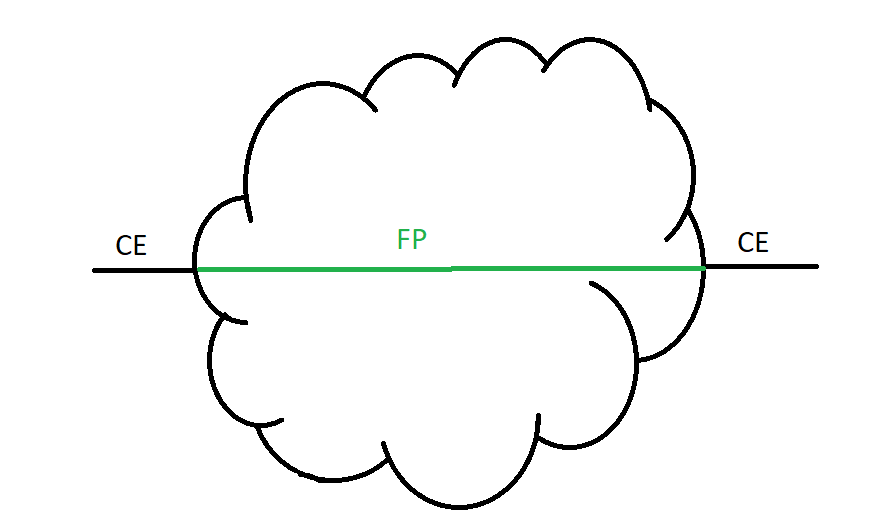
The hosts are attached to a „Classical Ethernet“ port, in the backbone FabricPath take care of delivering packets based on routing decisions. Packets can be also sent through more than one interface to the destination having so the chance to use all links across the network
Traffic Engineering
Lets have a look at the routing table on the Nexus5000-2 where one of the ubuntu hosts is attached. The destination host is attached to the switch Nexus5000-6 and based on the table below it can be reached through switch 4.
Nexus5000-2# show fabricpath isis topology view
 FabricPath IS-IS Topology
 Fabricpath IS-IS domain: default
 MT-0
 Fabricpath IS-IS Graph 0 Level-1 for MT-0 IS routing table
 Nexus5000-3.00, Instance 0x0000000B
    *via Nexus5000-3, Ethernet2/3, metric 400
 Nexus5000-4.00, Instance 0x0000000B
    *via Nexus5000-4, Ethernet2/4, metric 400
 Nexus5000-1.00, Instance 0x0000000B
    *via Nexus5000-1, Ethernet2/1, metric 400
 Nexus5000-5.00, Instance 0x0000000B
    *via Nexus5000-4, Ethernet2/4, metric 800
    *via Nexus5000-1, Ethernet2/1, metric 800
 Nexus5000-6.00, Instance 0x0000000B
    *via Nexus5000-4, Ethernet2/4, metric 800
 Nexus5000-2#
Let us imagine that we want to reach the ubuntu host on the right side only through Nexus5000-1 because Nexus5000-4 is having some complications due a lot of traffic passing by through this switch. However based on the routing table the traffic will be sent through Nexus5000-4.
I manually manipulated the links in red and set 200ms of latency, 77ms of jitter and 45% of packet loss. A nightmare! We want to alleviate this switch in order to avoid packet loss.
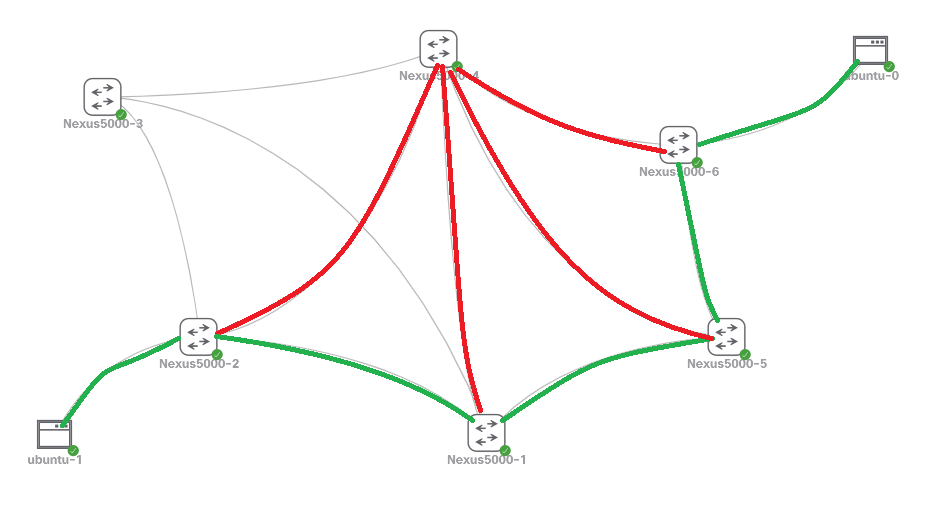
To achieve this we are gonna manipulate the metric on the switch Nexus5000-4 towards the other switches to make it less likely.
Nexus5000-4(config)# int e2/1-5
Nexus5000-4(config-if-range)# fabricpath isis metric 900
Nexus5000-4(config-if-range)#
Now let us check the routing table on Nexus5000-2 again. Let us see what is different.
Nexus5000-2# show fabricpath isis topology view
FabricPath IS-IS Topology
Fabricpath IS-IS domain: default
MT-0
Fabricpath IS-IS Graph 0 Level-1 for MT-0 IS routing table
Nexus5000-3.00, Instance 0x00000010
*via Nexus5000-3, Ethernet2/3, metric 400
Nexus5000-4.00, Instance 0x00000010
*via Nexus5000-4, Ethernet2/4, metric 400
Nexus5000-1.00, Instance 0x00000010
*via Nexus5000-1, Ethernet2/1, metric 400
Nexus5000-5.00, Instance 0x00000010
*via Nexus5000-1, Ethernet2/1, metric 800
Nexus5000-6.00, Instance 0x00000010
*via Nexus5000-1, Ethernet2/1, metric 1200
Nexus5000-2#
I will shown you how does it look when we do it directly in production.
I will ping from one host to the other, observ the first packets and then switch an check the difference.
root@ubuntu:~# ping 10.10.40.2 -s 1400
PING 10.10.40.2 (10.10.40.2) 1400(1428) bytes of data.
1408 bytes from 10.10.40.2: icmp_seq=3 ttl=64 time=922 ms
1408 bytes from 10.10.40.2: icmp_seq=4 ttl=64 time=852 ms
1408 bytes from 10.10.40.2: icmp_seq=7 ttl=64 time=805 ms
1408 bytes from 10.10.40.2: icmp_seq=10 ttl=64 time=819 ms
1408 bytes from 10.10.40.2: icmp_seq=14 ttl=64 time=723 ms
1408 bytes from 10.10.40.2: icmp_seq=19 ttl=64 time=827 ms
1408 bytes from 10.10.40.2: icmp_seq=21 ttl=64 time=859 ms
1408 bytes from 10.10.40.2: icmp_seq=25 ttl=64 time=765 ms
1408 bytes from 10.10.40.2: icmp_seq=28 ttl=64 time=372 ms
1408 bytes from 10.10.40.2: icmp_seq=29 ttl=64 time=6.60 ms
1408 bytes from 10.10.40.2: icmp_seq=30 ttl=64 time=6.49 ms
1408 bytes from 10.10.40.2: icmp_seq=31 ttl=64 time=8.76 ms
1408 bytes from 10.10.40.2: icmp_seq=32 ttl=64 time=6.48 ms
1408 bytes from 10.10.40.2: icmp_seq=33 ttl=64 time=6.54 ms
1408 bytes from 10.10.40.2: icmp_seq=34 ttl=64 time=6.58 ms
1408 bytes from 10.10.40.2: icmp_seq=35 ttl=64 time=6.36 ms
1408 bytes from 10.10.40.2: icmp_seq=36 ttl=64 time=6.44 ms
1408 bytes from 10.10.40.2: icmp_seq=37 ttl=64 time=6.30 ms
1408 bytes from 10.10.40.2: icmp_seq=38 ttl=64 time=6.32 ms
1408 bytes from 10.10.40.2: icmp_seq=39 ttl=64 time=6.45 ms
1408 bytes from 10.10.40.2: icmp_seq=40 ttl=64 time=6.57 ms
1408 bytes from 10.10.40.2: icmp_seq=41 ttl=64 time=6.37 ms
1408 bytes from 10.10.40.2: icmp_seq=42 ttl=64 time=6.34 ms
1408 bytes from 10.10.40.2: icmp_seq=43 ttl=64 time=6.36 ms
1408 bytes from 10.10.40.2: icmp_seq=44 ttl=64 time=6.58 ms
^C
--- 10.10.40.2 ping statistics ---
44 packets transmitted, 25 received, 43% packet loss, time 43411ms
rtt min/avg/max/mdev = 6.303/282.134/922.626/378.397 ms
root@ubuntu:~#
We can see a huge difference and we can also see how smooth the change was. At the beginning we clearly see a lot of sequences missing and a high latency between both hosts. After changing the metric on Nexus5000-4 the latency clearly dropped and no more packet loss were identified.
Also Nexus5000-3 on the top to the left, will prefer Nexus5000-1 to get to Nexus5000-6
Nexus5000-3# show fabricpath isis topology view
 FabricPath IS-IS Topology
 Fabricpath IS-IS domain: default
 MT-0
 Fabricpath IS-IS Graph 0 Level-1 for MT-0 IS routing table
 Nexus5000-4.00, Instance 0x0000007E
    *via Nexus5000-4, Ethernet2/1, metric 400
 Nexus5000-1.00, Instance 0x0000007E
    *via Nexus5000-1, Ethernet2/2, metric 400
 Nexus5000-5.00, Instance 0x0000007E
    *via Nexus5000-1, Ethernet2/2, metric 800
 Nexus5000-2.00, Instance 0x0000007E
    *via Nexus5000-2, Ethernet2/3, metric 400
 Nexus5000-6.00, Instance 0x0000007E
    *via Nexus5000-1, Ethernet2/2, metric 1200
 Nexus5000-3#
Conclusion
We have now 2021 and FabricPath is not the newest technology. If you have low convergence time as a network requirement, then FP could be also a good option.
See you next time 🙂
 I bit, therefore I byte