
fourth post in this serie. CCIE+Enterprise+Infrastructure+(v1.0+RevA)+Exam+Topics.pdf (cisco.com)
Which problems do these features solved?
These two features help on one side to extend the visibility of the the network topology, their sharing media and capabilities of its members by exchanging information on the control plane.
On the other side both protocols help devices to obtain vital information about the way they have to work, like VoIP phones obtaining the VLAN-ID they need to use in order to communicate.
CDP
It is a Cisco propieatary layer-2 protocol that allows to exchange information about neighbors sharing a media and their capabilities. A simple CDP Frame can contain a lot of useful information for a network administrator. This feature is enabled globally by default and can be disabled and be enabled on port basis.
Since CDP is by default on, we can it disabled it globally or on a specific interface.
Switch(config)#int e0/1
Switch(config-if)#no cdp enable
Switch(config-if)#
Console output
By issuing the following to commands we can see information about the global CDP settings and the neighbors on that switch.
Switch#show cdp
Global CDP information:
        Sending CDP packets every 60 seconds
        Sending a holdtime value of 180 seconds
        Sending CDPv2 advertisements is  enabled
Switch#
Switch#sh cdp neighbors
Capability Codes: R - Router, T - Trans Bridge, B - Source Route Bridge
                  S - Switch, H - Host, I - IGMP, r - Repeater, P - Phone,
                  D - Remote, C - CVTA, M - Two-port Mac Relay

Device ID        Local Intrfce     Holdtme    Capability  Platform  Port ID
Switch           Eth 0/0           159             R S I  Linux Uni Eth 0/0
Switch           Eth 0/1           144             R S I  Linux Uni Eth 0/0

Total cdp entries displayed : 2
Switch#
Lets have a deeper look into the CDP frame captured by wireshark on a test switch.
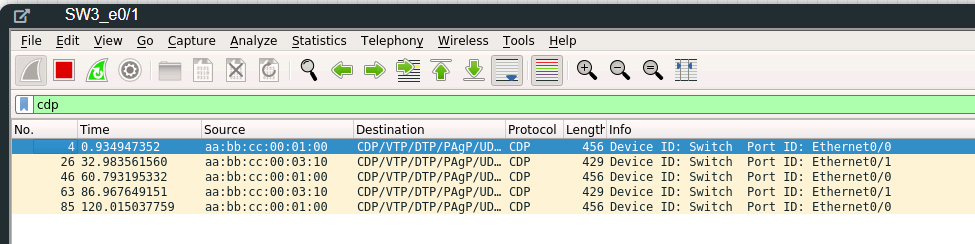
We can see frames arriving from two different sources aa:bb:cc:00:01:00 and aa:bb:cc:00:11:10. If we pay attention to the first one the frames are arriving every 60 seconds, this is the default timer. Now lets have a look on all this useful information.
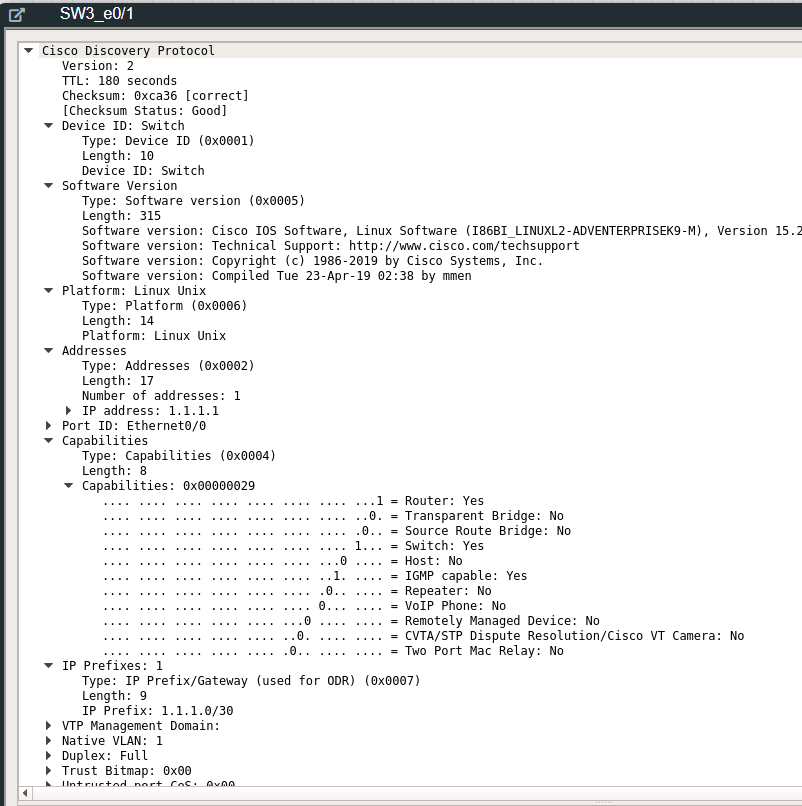
We can see things like, which protocol version is being used (Version: 2). We are also able to see what type of device it is and its version. We can also see whats the Port we are sharing between this link (Pord ID: Ethernet0/0).
    Device ID: Switch
        Type: Device ID (0x0001)
        Length: 10
        Device ID: Switch
...
    Port ID: Ethernet0/0
        Type: Port ID (0x0003)
        Length: 15
        Sent through Interface: Ethernet0/0
Additional we see the capabilities of this device. It is a router device IGMP capable and can perform switching.
   Capabilities
        Type: Capabilities (0x0004)
        Length: 8
        Capabilities: 0x00000029
            .... .... .... .... .... .... .... ...1 = Router: Yes
            .... .... .... .... .... .... .... ..0. = Transparent Bridge: No
            .... .... .... .... .... .... .... .0.. = Source Route Bridge: No
            .... .... .... .... .... .... .... 1... = Switch: Yes
            .... .... .... .... .... .... ...0 .... = Host: No
            .... .... .... .... .... .... ..1. .... = IGMP capable: Yes
            .... .... .... .... .... .... .0.. .... = Repeater: No
            .... .... .... .... .... .... 0... .... = VoIP Phone: No
            .... .... .... .... .... ...0 .... .... = Remotely Managed Device: No
            .... .... .... .... .... ..0. .... .... = CVTA/STP Dispute Resolution/Cisco VT Camera: No
            .... .... .... .... .... .0.. .... .... = Two Port Mac Relay: No
Based on the output that we saw at the beginning there was a lot of information missing. Why is this information not being displayed on the console? There is an additional argument called ‚detail‘, that allow us to see more information about our neighbors in the console.
Switch# show cdp neighbors ethernet 0/1 detail
-------------------------
Device ID: Switch
Entry address(es):
  IP address: 1.1.1.1
Platform: Linux Unix,  Capabilities: Router Switch IGMP
Interface: Ethernet0/1,  Port ID (outgoing port): Ethernet0/0
Holdtime : 157 sec

Version :
Cisco IOS Software, Linux Software (I86BI_LINUXL2-ADVENTERPRISEK9-M), Version 15.2(CML_NIGHTLY_20190423)FLO_DSGS7, EARLY DEPLOYMENT DEVELOPMENT BUILD, synced to  V152_6_0_81_E
Technical Support: http://www.cisco.com/techsupport
Copyright (c) 1986-2019 by Cisco Systems, Inc.
Compiled Tue 23-Apr-19 02:38 by mmen

advertisement version: 2
Management address(es):
  IP address: 1.1.1.1


Total cdp entries displayed : 1
Switch#
We also see a very interesting field telling us the local configured prefixes of this device.
  IP Prefixes: 1
        Type: IP Prefix/Gateway (used for ODR) (0x0007)
        Length: 9
        IP Prefix: 1.1.1.0/30
I was just wondering what happens if the remote device has thousand of prefixes configured. I just added around 10 000 loopback addresses and started again with the wireshark capture.
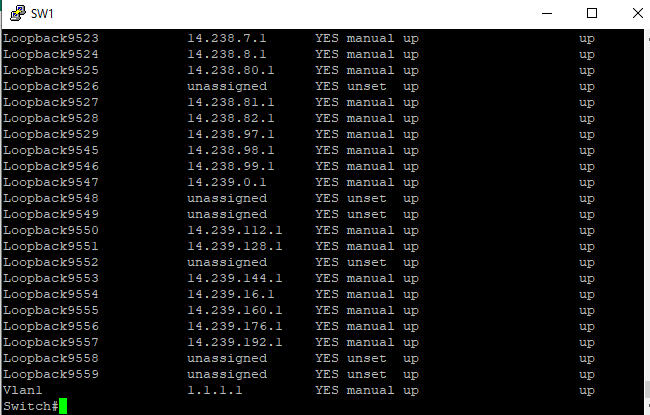
Once the frame arrived I saw it is 1514 bytes (Remember L2 MTU?). Well… it seems the CDP frame is generated with a certain amount of size and the rest of the information is just left behind. At the end of the frame they where a lot of information missing, like duplex, native vlan, VTP Management domain, it just ends and not even all loopback addresses has been shown. quite interesting..


LLDP
Link Layer Discovery Protocol (LLDP) is a standard layer-2 protocol that works in a similar way CDP does. It is not enabled globally by default and can be also be enabled on a port basis. Cisco devices support IEEE 802.1ab version of LLDP.
Enabling LLDP globally and on a port basis.
Switch#conf t
Enter configuration commands, one per line.  End with CNTL/Z.
Switch(config)#lldp run
Switch(config)#int e0/1
Switch(config-if)#lldp receive
Switch(config-if)#lldp transmit
Switch(config-if)#
Console output
By issuing the following to commands we can see information about the global CDP settings and the neighbors on that switch.
Switch#show lldp
Global LLDP Information:
Status: ACTIVE
LLDP advertisements are sent every 30 seconds
LLDP hold time advertised is 120 seconds
LLDP interface reinitialisation delay is 2 seconds
Switch#
Switch#show lldp neighbors
Capability codes:
(R) Router, (B) Bridge, (T) Telephone, (C) DOCSIS Cable Device
 WLAN Access Point, (P) Repeater, (S) Station, (O) Other
Device ID Local Intf Hold-time Capability Port ID
Switch Et0/1 120 R Et0/0
Total entries displayed: 1
Switch#
WLAN Access Point, (P) Repeater, (S) Station, (O) Other
Device ID Local Intf Hold-time Capability Port ID
Switch Et0/1 120 R Et0/0
Total entries displayed: 1
Switch#
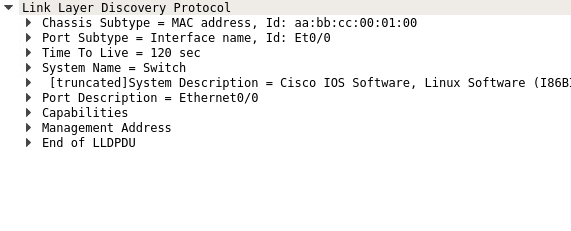
The frame received looks more or less similar to CDP.
LLDP-MED (Media Endpoint Discovery)
For better interoperability between network devices and VoIP Phones there is an extension of LLDP called MED (Media Endpoint Discovery). With this additional information the network is able to help devices to get an adaquate support.
Over this extension information like: Port, VLAN, model, serial number, vendor, etc. will be exchanged.
Another two important things to mention about these extensions are: Network policies and power consumption. The switch can apply a specific network policy based on information received over LLDP-MED. Also the need of power over a port is exchanged over LLDP-MED. So, next time you wonder why your VoIP phone does not come up, just check if LLDP will solve your issues.
Conclusion
CDP and LLDP are very useful tools that can help you to understand how a network is build and which devices are connected to it. However nowdays for several reasons security experts suggest to disable it in order to prevent that a intruder can gain more information about the infrastructure by just reading this information.
I dont agree and prefer to have it enabled for better troubleshooting and network visibility.
 I bit, therefore I byte