
Hello everyone!
Normally while using HSRP as an FHRP the device will be able to switch between active and standby router based on different situations.
- The group interface is down.
- Group priority has been lowered on the interface manually.
- Group priority has been lowered on the interface by a tracking element.
- The device stop receiving Hello-Packets from his neighbor.
So far so good… But what happens if the link of one router is so bad that has packetloss but all tracking objects and hello packets always arrive. This will cause a bad quality of the link. This could be slightly fixed by adding a script to our configuration.
Cisco Embedded Event Manager (EEM) offers us a sub-system that checks in real-time the status of some pre-defined parameters.
There are thousands of manners how to deal with it. I will post a small snippet how to check the input errors of an interface.
For this test, I will manipulate the settings of the links by configuring it with half-duplex on both sides to force the input errors to increment.
The host 192.168.1.3 will try to reach the server on the top of the picture below by pinging it constantly. As soon as the errors on the interface reach the threshold of 50, the interfaces gig0/1 and gig0/2 on IOSv-1 will be shut down. The standby router IOSv-2 will become active for both groups. We will see if the client realized that his path has been changed.

Configuration
The rest of the configuration has been made as described in the topology picture above.
event manager applet interface_watch_in_err authorization bypass
event interface name GigabitEthernet0/1 parameter input_errors entry-op ge entry-val 50 entry-type increment poll-interval 15
action 1.0 cli command "enable"
action 2.0 cli command "configure terminal"
action 3.0 cli command "interface gig0/1"
action 4.0 cli command "shutdown"
action 5.0 cli command "interface gig0/2"
action 6.0 cli command "shutdown"
Vertification
We will start a ping from both sides to generate traffic and increase the errors on the interface. On our HSRP active device we can see the at some point that both interfaces, gig0/1 and gig0/2, has been shut down.
Router#
*May 12 10:26:24.570: %HSRP-5-STATECHANGE: GigabitEthernet0/1 Grp 1 state Active -> Init
*May 12 10:26:24.782: %HSRP-5-STATECHANGE: GigabitEthernet0/2 Grp 2 state Active -> Init
*May 12 10:26:26.538: %LINK-5-CHANGED: Interface GigabitEthernet0/1, changed state to administratively down
*May 12 10:26:26.753: %LINK-5-CHANGED: Interface GigabitEthernet0/2, changed state to administratively down
*May 12 10:26:27.538: %LINEPROTO-5-UPDOWN: Line protocol on Interface GigabitEthernet0/1, changed state to down
*May 12 10:26:27.753: %LINEPROTO-5-UPDOWN: Line protocol on Interface GigabitEthernet0/2, changed state to down
Router#
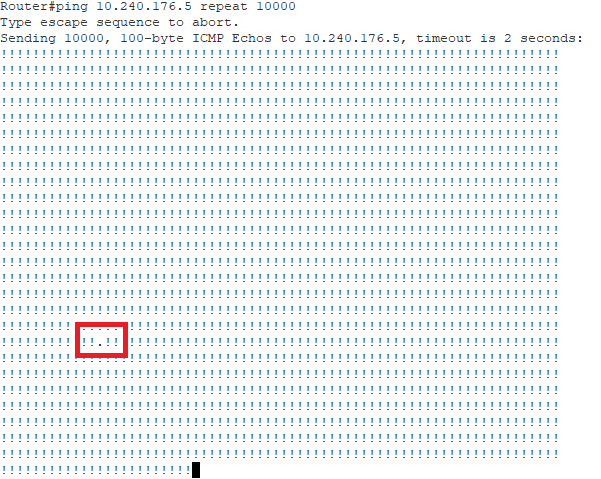
While pinging it looks like the host has lost the connection for at least two seconds, which is very acceptable.
Thanks for reading and hopefully this post was helpful for you.
See you on my next post!
 I bit, therefore I byte