Cisco EVPN – VxLAN using unicast

Hello there! It has been a long time since my last post. Currently I am dealing with EVPN VxLAN and managed it to run a demonstration on my small modest virtual lab environment.

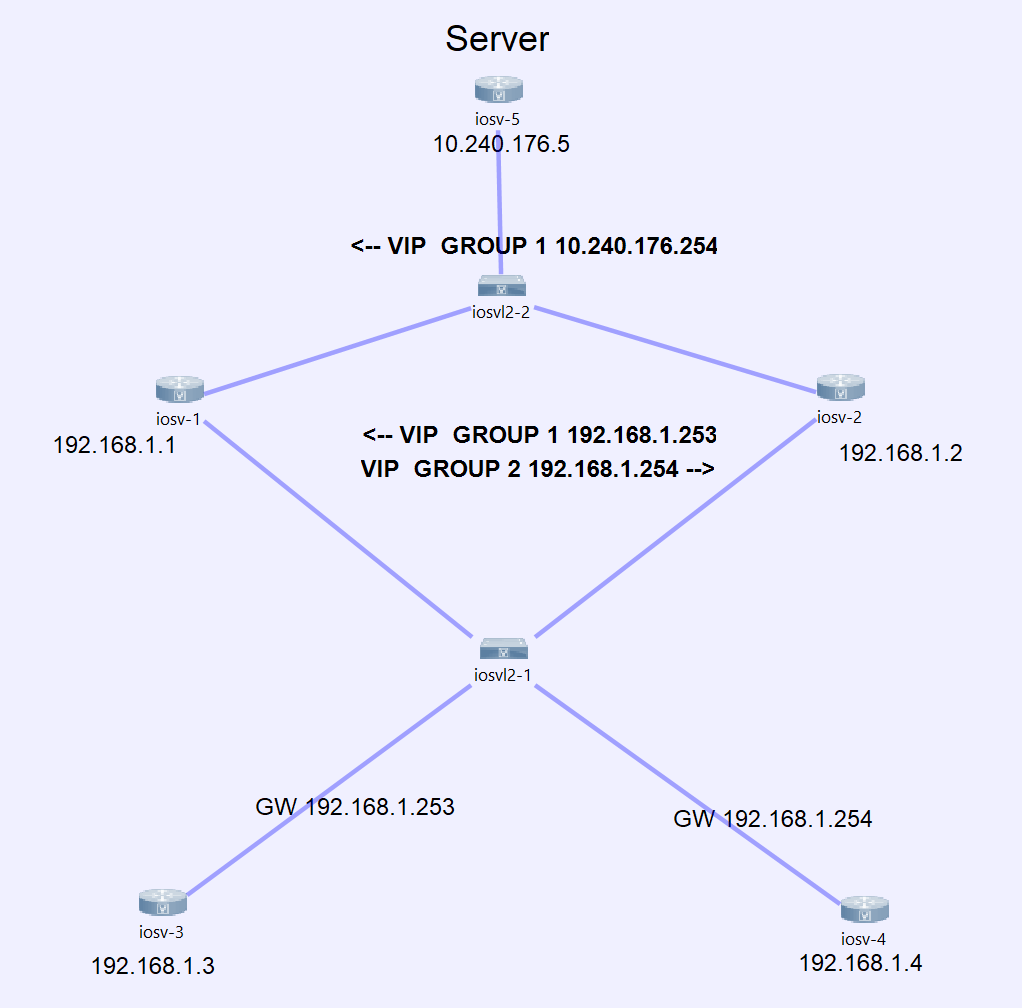
One of my first posts in this blog was about how to run VxLAN over an IPSEC Tunnel using a Fortigate firewall. This setup has some limitations when it comes to scalability or performance. In this case we are gonna see a very simple design and implementation using a spine & leaf architecture and unicast to replicate our data across the network.

There are still a lot of legacy DC running spanning-tree out there. It is not a crime doing it, since the network should meet customer requirements without adding unnecessary complexity. But… imagine you are running a financial network and your network flow relies on STP. You will face two challenges:

  1. The convergence time between failure and recovery are possibly to high.
  2. You will have some interfaces in the blocking state, which will impede you to use all the BW available in the network. More precisely you will end up with a lot of unused ports.
Allgemein CCIE Journey CIsco Design Home Routing & Switching Switching

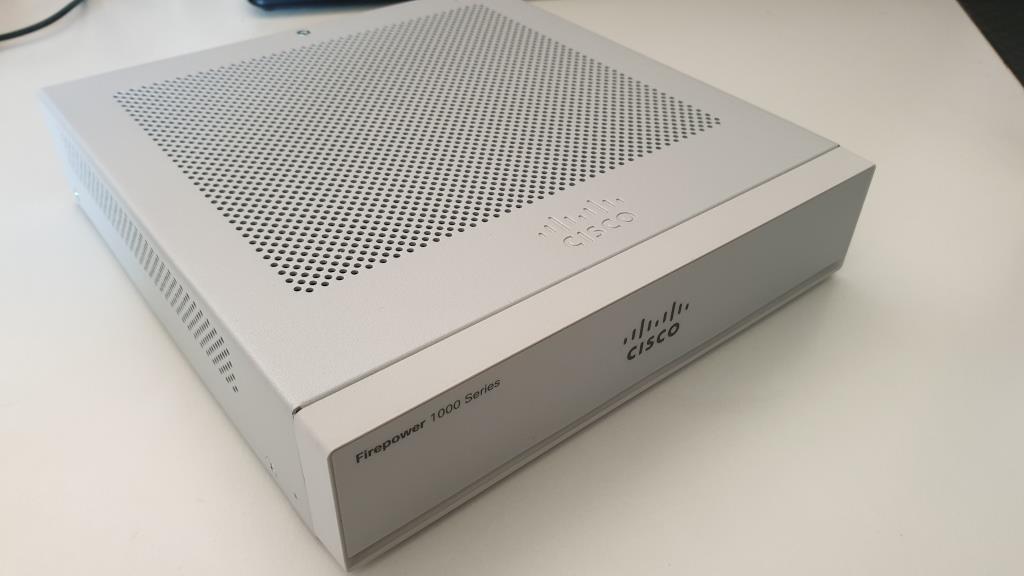
Unboxing Cisco Firepower 1010 – Mixed feelings

Hello everyone. Today we have the honor to be the witness of the unboxing of my new Cisco Firepower 1010. I have big expectations and I will spend some time to cover all the needed basic information about this device.

At the time I am writing this post there is already a newer version of the software released (6.6). The devices are being delivered with version 6.4 and this will be the version we will see in this post. Once I’ve played around, the device will be upgraded and for sure a new post will be written regarding the new features.

Allgemein CIsco Firepower Firewall Hardware Home Network Security Security

EEM – Shutting down unstable links while using HSRP

Hello everyone!

Normally while using HSRP as an FHRP the device will be able to switch between active and standby router based on different situations.

  • The group interface is down.
  • Group priority has been lowered on the interface manually.
  • Group priority has been lowered on the interface by a tracking element.
  • The device stop receiving Hello-Packets from his neighbor.

So far so good… But what happens if the link of one router is so bad that has packetloss but all tracking objects and hello packets always arrive. This will cause a bad quality of the link. This could be slightly fixed by adding a script to our configuration.

Cisco Embedded Event Manager (EEM) offers us a sub-system that checks in real-time the status of some pre-defined parameters.

There are thousands of manners how to deal with it. I will post a small snippet how to check the input errors of an interface.

For this test, I will manipulate the settings of the links by configuring it with half-duplex on both sides to force the input errors to increment.

Allgemein Home Network Programmability Routing & Switching Snippets Switching

Point-to-Point links with /31 – RFC-3021

Hello everyone! Today something old… but anyway interesting.

We know since last century that we will not have enough IPv4 addresses to satisfiy all our needs. Therefore some guys proposed twenty years ago in RFC-3021 a way to conserve the amount of public addresses. Link to RFC-3021.

Lets see a comparison for better understanding and to realize the purpose of it.

Bit prefixesAmount of IP-AddressesAmount of hostAmount of subnet within /24
/304264
/3122128

We clearly see that using a /31 we will be able to double the amount of point-to-point links that we can create. This demonstrate the inefficiency of running PTP-Links using a /30-bit prefix. This is very important to consider if you have a limited amount of public IPv4 addresses.

Allgemein Design Home Routing Routing & Switching

Sending traffic to SFR module – Cisco ASA 5506-X with FirePOWER services

By default, even if the box is fully functional and correctly installed, the traffic won’t be passed to the FirePOWER instance. We will have to configure it by ourselves.

To accomplish this we will create an ACL for the traffic we would like to pass by to the FirePOWER instance.

access-list ACL_SFR extended permit ip any any

afterwards we will create a class-map where we will match all the traffic from the ACL „ACL_SFR“. We will name it „TO-SFR“ and it should look like this.

Allgemein ASA Firewall Home Network Security Security

Cisco ASA 5506-X with FirePOWER services in inline mode

Hello everyone. Yes, it is 2020 and I am still speaking about ASA…

On one side I recently bought myself an ASA-5506-X with FirePOWER services, to extend my lab, to see how it works, and to do some experiments I can not do on a customer environment :). On the other side I also recently bought a Firepower 1010 to see the evolution Cisco made from ASA to ASA with FirePOWER and finally Firepower. We also have to assume that there are still a lot of ASA Firewalls out there and they will remain for a while before replacement.

At first sight, we may not find any difference between the wording Firepower and FirePOWER. But there is one… a significant one.

When Cisco mentions the word FirePOWER, then they talk about ASA-Devices with a Firepower Image on top running as a module.

In contrast to this, when Cisco speaks about Firepower then they are mentioning the Firepower Threat Defense device.

While reading this post, keep in mind that it is NOT a configuration guide. This text has been written with the simple purpose to describe the functionality, architecture and design without going too deep in detail.

Allgemein ASA Firepower Firewall Home Security

Installing Cisco ISE 2.6 in 5 minutes

In this shortly post we will have a closer look how we can install ISE 2.6 on a virtual machine. I made a short video (My first one) how to go through this easy process of installation. The video has been speeded up, so it may take definetly longer on your machine.

For the adquisition of the image you must be entitle by having a valid contract for this product.

Remark I: I could observed that the VM works better with 16 GB RAM rather than 12. In case you assign less, the only effect is, that the ISE Application wont work fluid. This means, you will ned patience when you click on a link/menu.

Remark II: Keep in mind while choosing a password with special characters that the keyboard layout for the installation is EN-US.

Cisco ISE 2.6 Installation
Background music: Johann Sebastian Bach, Cello Suite No. 1 in G Major Prélude

Once all the services are up and running, you will be able to access to the admin portal by opening the https://IP_ADDRESS on your browser. This will take a while depending of the performance of your machine. In my case it always take about 15 minutes… so be patient.

Thanks and hope to see you on my next post!

802.1x Allgemein CCIE Journey Home ISE Security

Device administration via RADIUS and Active-Directory

Hello everyone. Today we will have a closer look at how to control the access to our network switches for operational purpose by using Cisco ISE and Active Directory.

We will assume that your Windows Server with AD services is already configured and fully functional.

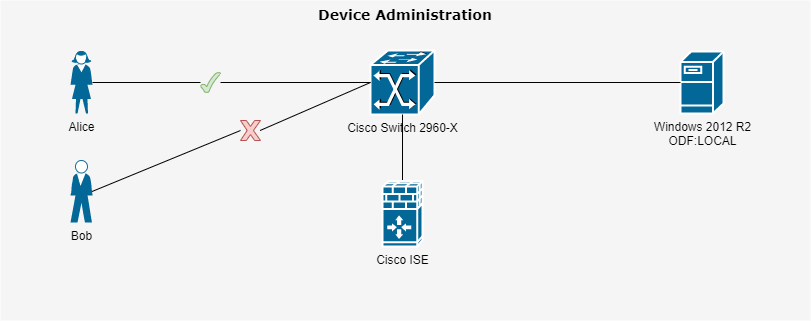
For our short example we will use a very small topology where the Cisco ISE and the Windows Server with Active directory services are located in the same subnet. It is true that for such a small IT-enviroment you could manage the credentials directly on the switch or on your ISE, but the example should demonstrate how we can deal with a big enterprise where there should be a certain level of transparency and security in the enviroment, avoiding unauthorized access to our infrastructure.

Within the AD we have placed three users in different security groups. Alice (IT), Bob (HR) and Robert (Marketing). Alice as an IT employee should be the only one entitled to access the switch.

Therefore we will create a policy-set on the ISE to grant acces to the switches only to people within the security group „Network-Operations“.

Let’s have a look at the topology…

Allgemein CIsco Home ISE Security Switching

VLAN-Hopping, Gefahr in non-routable Netzwerke

Schauen wir uns ein Beispiel an, welches Anfangs vielleicht ein wenig verrückt und unrealistisch klingt, aber dann noch beängstigend wird.

Wir gehen weg von den Access-Layer und bewegen wir uns zwischen Core oder im Distribution Bereich.

Um die Dramatik in meinem Beispiel zu erhöhen, stellen wir uns eine Umgebung in der Forschung vor. Wie wir denken, arbeiten diese mit hochmoderne Computers, die oft mittels GPUs schwierige Simulationen Tage- oder Wochenlang berechnen. Aber es gibt auch andere Geräte, wie Mikroskope, die weiterhin über einen Serial RS-232 Kabel angeschlossen sind, oder Software die nur unter Windows XP laufen, oder sogar eine Datenbank in Microsoft Access 2000… vielleicht auch Microsoft Access 1998… Ja, eine Datenbank aus dem letzten Jahrhundert. Viele schütteln jetzt den Kopf und behaupten laut: „Wie kann das denn sein?“. Dennoch werden mir viele bestätigen können, das solche Systeme noch im Umlauf sind, und es ist auch nicht vorgesehen, diese zu aktualisieren, oder zu ersetzen! Es werden sogar alte Geräte gekauft, um diese als Backup zu haben, um ein Windows 2000 fähiges Gerät zu haben, damit man die Datenbank innerhalb ein paar Stunden oder Tagen wiederherstellen kann.

Systeme die seit mehr als 10 Jahre keine Patch mehr erhalten haben und tausende von offenen Systemlücken enthalten.

Solche Geräte gehen an der Abteilung IT-Security nicht vorbei. Die wissen davon Bescheid, und können in vielen Situationen nichts anderes entscheiden als solche Systeme, die in einem so genantes „non-routable“ Netzwerk platzieren.

Auf dem ersten Blick klingt das nach einem Plan… Aber…

Allgemein CCIE Journey CIsco Home Network Security Routing & Switching Security Switching